
Example number 39
<html ng-app="countryApp">
  <head>
    <meta charset="utf-8">
    <title>Angular.js Example</title>
    <script src="//cdnjs.cloudflare.com/ajax/libs/angular.js/1.2.10/angular.min.js"></script>
    <script src="//cdnjs.cloudflare.com/ajax/libs/angular.js/1.2.10/angular-route.min.js"></script>
    <script>
      var countryApp = angular.module('countryApp', ['ngRoute']);

      countryApp.config(function($routeProvider) {
        $routeProvider.
          when('/', {
            templateUrl: 'country-list.html',
            controller: 'CountryListCtrl'
          }).
          when('/:countryName', {
            templateUrl: 'country-detail.html',
            controller: 'CountryDetailCtrl'
          }).
          otherwise({
            redirectTo: '/'
          });
      });

      countryApp.controller('CountryListCtrl', function ($scope, $http){
        $http.get('countries.json').success(function(data) {
          $scope.countries = data;
        });
      });

      countryApp.controller('CountryDetailCtrl', function ($scope, $routeParams, $http){
        $scope.name = $routeParams.countryName;

        $http.get('countries.json').success(function(data) {
          $scope.country = data.filter(function(entry){
            return entry.name === $scope.name;
          })[0];
        });
      });
    </script>
  </head>
  <body>
    <div ng-view></div>
  </body>
</html>
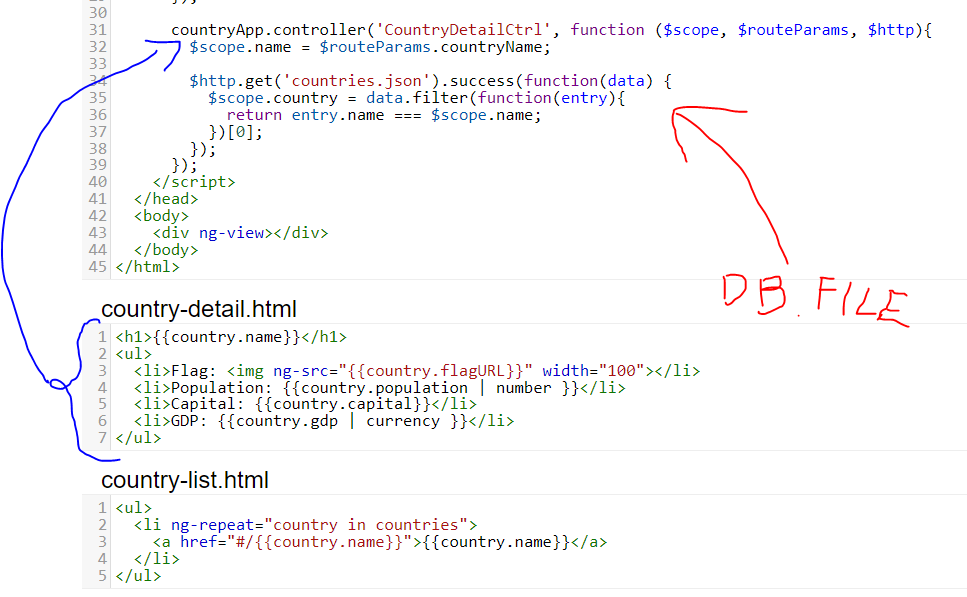
This example surfacing data on the country details page. By using filtering gets first data in array and set this element to the scope property country on the model. From now country detail page have access to the value from DB file and using define detail view from country-detail.html.
Demo version
Another example on next page.