example no. 4
<!DOCTYPE html>
<html>
<body>

<h2>Store and retrieve data from local storage.</h2>
<p id="demo"></p>
<p id="demo1"></p> <!-- row added by Dawid Andrejczuk -->
<p id="demo2"></p> <!-- row added by Dawid Andrejczuk -->
<script>
// Storing data:
const myObj = { name: "John", age: 31, city: "New York" };
const myJSON = JSON.stringify(myObj);
localStorage.setItem("testJSON", myJSON);

// Retrieving data:
let text = localStorage.getItem("testJSON");
let obj = JSON.parse(text);
document.getElementById("demo").innerHTML = obj.name;
// Section below below added by Dawid Andrejczuk.
document.getElementById("demo").innerHTML = obj.age;
document.getElementById("demo1").innerHTML = obj.name;
document.getElementById("demo2").innerHTML = obj.city;
</script>

</body>
</html>
This code demonstrates how to store and retrieve data using local storage in a web browser.
First, an object myObj is created with properties name, age, and city. The JSON.stringify() method is then used to convert the object into a JSON string, which is stored in local storage with the key „testJSON” using the localStorage.setItem() method.
Next, the data is retrieved from local storage using the localStorage.getItem() method with the key „testJSON”. The retrieved JSON string is then converted back into an object using the JSON.parse() method and assigned to the variable obj.
Finally, the values of the properties of the obj object are displayed on the web page using the document.getElementById().innerHTML method. The innerHTML property is used to update the HTML content of the elements with IDs „demo”, „demo1”, and „demo2” with the values of obj.name, obj.age, and obj.city, respectively.
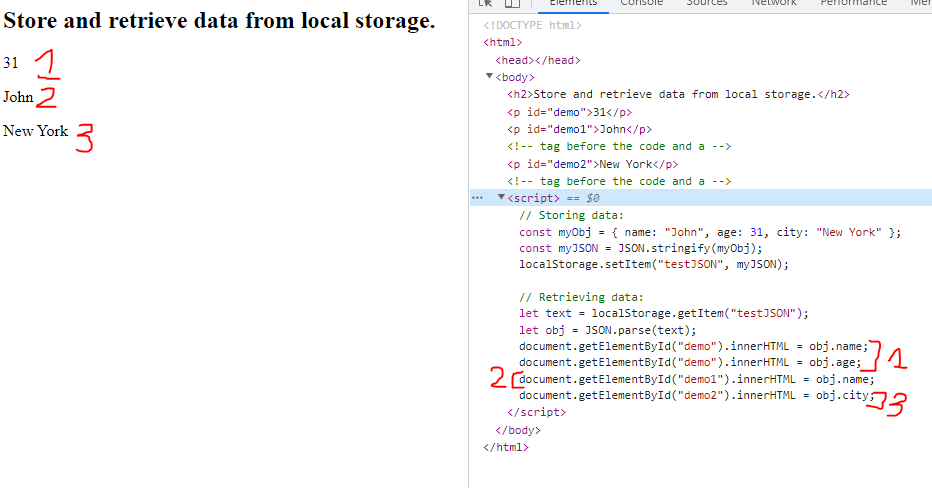
Picture number one represent output value compare to source code. Section [1] in redlines have same IDs. The implementation the value in “demo” have been replace by last object. That’s why we only see one resould instead two rows of getElementById.
Section [2] in redlines have changed object address corresponding to local storage. To prevent overwriting output data the ID was change on “demo1”.
Section [3] in redlines have same role as section [2] but object was changed to city.