
example no. 13
<!DOCTYPE html>
<html>

<body>

<h1>Access an Array by Index</h1>
<p id="demo"></p>

<script>
const myJSON = '["Ford", "BMW", "Fiat"]';
const myArray = JSON.parse(myJSON);
document.getElementById("demo").innerHTML = myArray[0];
</script>

 <!-- section below added by Dawid Andrejczuk -->
<p id="demo1"></p>

<script>
document.getElementById("demo1").innerHTML = myArray[1];
</script>

<p id="demo2"></p>

<script>
document.getElementById("demo2").innerHTML = myArray[3];
</script>

<p id="demo3"></p>

</body>
</html>
This code demonstrates how to access elements of an array using JavaScript.
First, a JSON string myJSON is declared with an array of car brands: [„Ford”, „BMW”, „Fiat”]. The JSON.parse() method is used to convert the JSON string into a JavaScript array, which is stored in the variable myArray.
Next, the first element of the myArray array, which is „Ford”, is accessed and displayed on the web page using the document.getElementById().innerHTML method with the ID „demo”. Then, three additional paragraphs are added to the web page with the IDs „demo1”, „demo2”, and „demo3”. The second script block accesses the second element of the myArray array, which is „BMW”, and displays it on the web page using the document.getElementById().innerHTML method with the ID „demo1”. The third script block tries to access the fourth element of the myArray array, which does not exist, resulting in an undefined value displayed on the web page with the ID „demo2”. Finally, the fourth paragraph with the ID „demo3” is left empty and does not display any content.
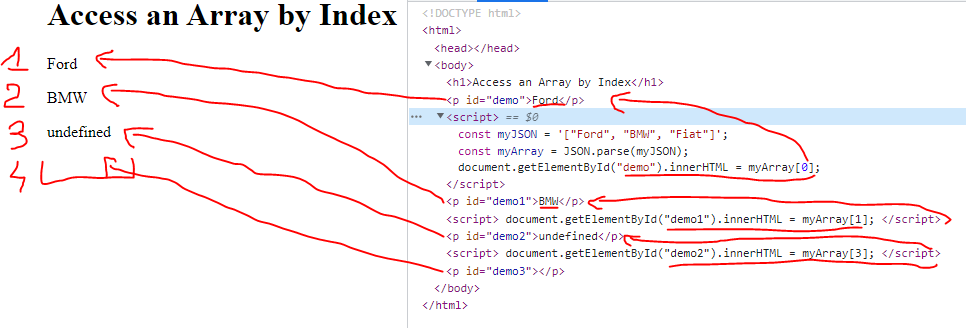
Picture number two represent output value compare to source code. Section [1] in redlines have took out data from array addressed from zero. It is important to remember that always arrays starts from zero not one.
Section [2] in redlines show same case as previous example with preventing overwrite data by changing IDs.
Section [3] in redlines shows example what happened when IDs is correct but we will exceed size of array. “Undefined” will be display.
Section [4] in redlines shows example what happened when IDs is incorrect. Nothing is display but the space on display is reserved for object.